
Knowing how to recognize a phishing email is no longer just an IT skill—it’s a critical business defense. Phishing attacks aren’t just an annoyance; they are a multi-billion dollar criminal industry. For businesses, they represent one of the most significant and costly security threats. While advanced technology and spam filters block many attempts, they can’t stop the one thing hackers target the most: human psychology.
The truth is, your employees are your last line of defense. This article isn’t about complex technical jargon; it’s a practical guide for professionals to quickly and confidently identify 99% of phishing attempts. Think of it as your team’s frontline defense.
Table of Contents
What is Phishing (And Why Is It So Dangerous)?
In simple terms, phishing is a fraudulent communication designed to trick you into revealing sensitive information. Attackers disguise themselves as a trustworthy person or entity—like your bank, a delivery service, or even your own IT department—in a practice known as “social engineering.”
The goal is almost always financial. By stealing login credentials, credit card numbers, or company secrets, attackers can commit identity theft, drain accounts, or hold your entire network hostage with a crippling ransomware attack.
The 5 Key Red Flags of a Phishing Attack
Your inbox is a battlefield, but you can win if you know what to look for. These are the five key signals that will help you recognize a phishing email.
1. A False Sense of Urgency or Fear
Hackers exploit human emotion. They create panic to make you act before you think. Look for phrases like:
- “Immediate action required”
- “Your account will be suspended within 24 hours”
- “Unusual login detected, please verify your account”
Legitimate organizations will not demand sensitive action from you under such intense, immediate pressure via a random email.
2. Suspicious Sender Address & Domain Mismatches
This is a classic technical giveaway. Always check the full email address, not just the display name. An attacker might make the name “PayPal Support,” but the email address itself tells the real story.
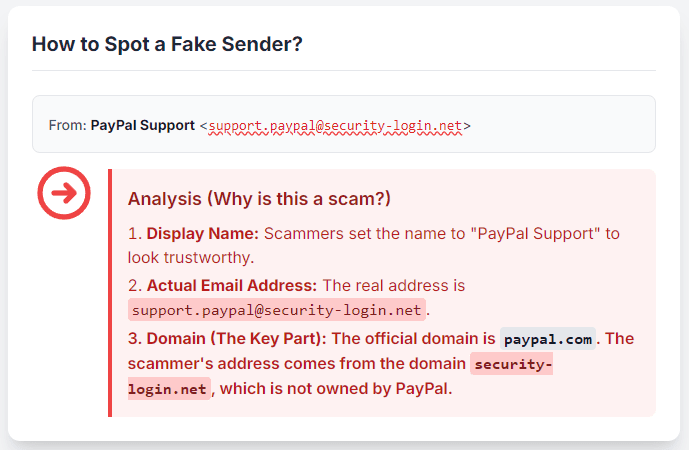
A legitimate email will come from the company’s domain (e.g., support@paypal.com). A phishing email will try to trick you with a slight variation or a different domain entirely.
- Phishing Example:
support@paypal.security-login.net - Why it’s fake: The real domain here isn’t “paypal.com.” It’s the part just before the
.net—which is “security-login.net.”
3. The “Hover-Before-You-Click” Rule: Check Those Links
Never click a link in an email you weren’t expecting. This is the most important habit to build.
On a desktop computer, hover your mouse cursor over the link without clicking it. Look in the bottom-left corner of your browser. Your browser will show you the actual web address the link leads to.
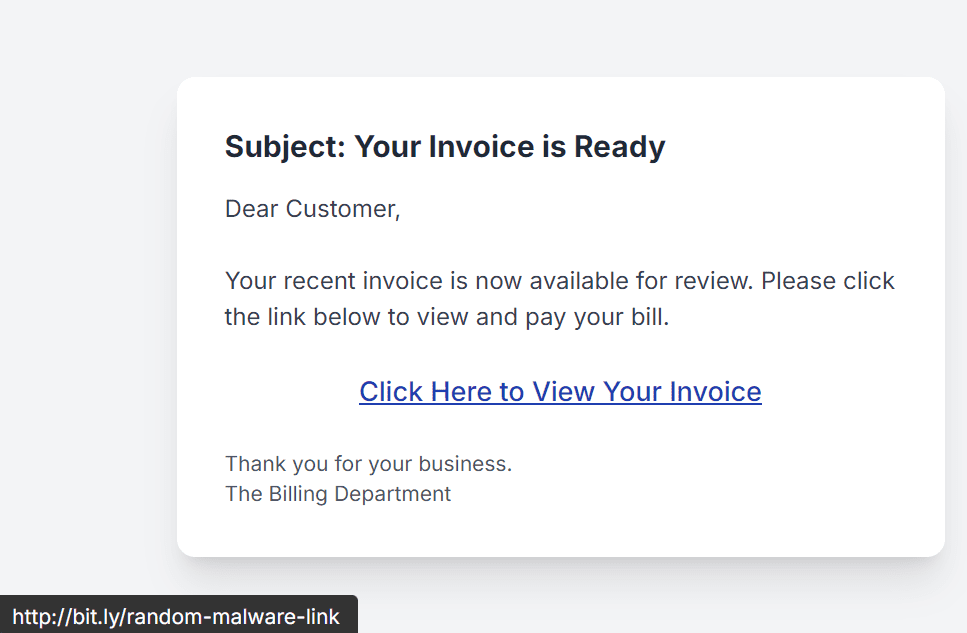
- Link Text:
Click Here to View Your Invoice - Actual Destination (visible on hover):
http://bit.ly/random-malware-link
If the destination URL looks strange, unrelated, or is a link shortener (like bit.ly) from an untrusted source, do not click it.
4. Poor Grammar, Spelling, or Unprofessional Design
Legitimate corporations have marketing departments, copy editors, and brand guidelines. While attackers are getting more sophisticated, many phishing emails are still filled with:
- Awkward phrasing
- Obvious spelling or grammar mistakes
- Low-quality, pixelated logos
- Strange formatting or colors
These are all signs that the email was not produced by a professional organization.
5. Unexpected Attachments or Requests for Sensitive Data
This is the final, golden rule.
Your bank or IT department will never ask you for your password via email. Period.
First, your bank, your government, or your company’s IT department will never ask you for your password, credit card number, or other personal credentials via email. Period.
Second, be extremely cautious of any unexpected attachments, especially .zip, .html, or .exe files. These are common ways to deliver malware that can infect your computer. If you weren’t expecting a file from someone, don’t open it.
What to Do If You Recognize a Phishing Email
So you’ve spotted one. What next?
- Don’t Panic. Don’t click any links, don’t open any attachments, and do not reply.
- Verify Independently. If the email claims to be from your bank, close the email. Open a brand new browser tab and type the bank’s official website address in yourself, or use a trusted bookmark. See if there are any real alerts waiting for you there.
- Report It. Use your company’s “Report Phishing” button in Outlook/Gmail, or forward the email as an attachment to your IT/Security department.
- Delete It. After reporting it, delete the email from your inbox and your trash folder.
Conclusion: Awareness is Your Strongest Shield
Technology and advanced security filters are essential, but they are only half of the solution. A well-informed, vigilant team is the most powerful and cost-effective security asset any business can have.
Building that awareness and fostering a culture of healthy skepticism isn’t just an IT concern—it’s a core business strategy. Knowing how to recognize a phishing email is a critical part of protecting your assets, your reputation, and your customers.
Need a bridge between Engineering and Marketing? I help companies translate intricate products into strategies that work for both algorithms and people.